Mark it up like paper
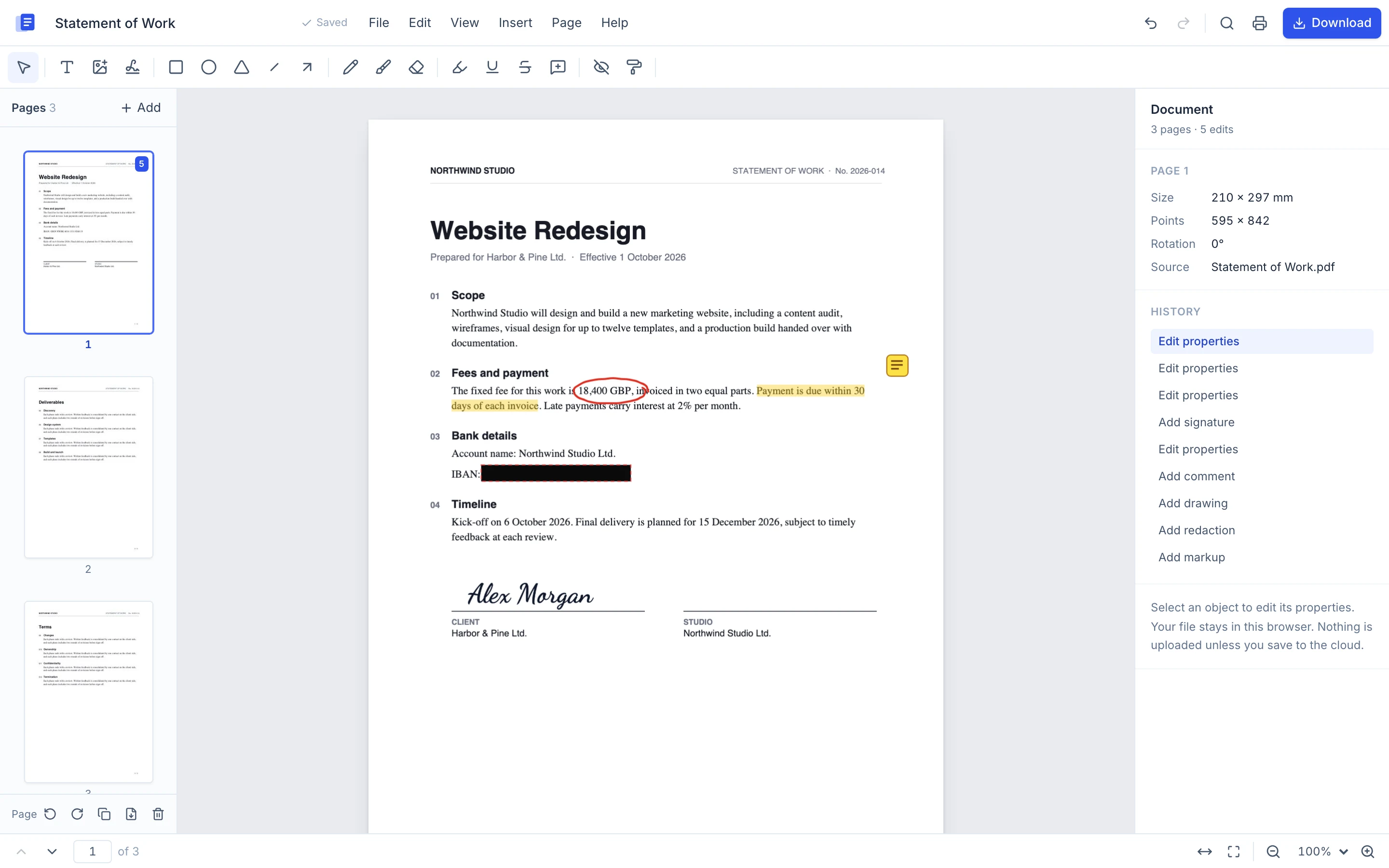
Highlight, underline and strike through the actual lines of text. Draw with a pen or a marker, add shapes and sticky notes.
Fusion OfficeEdition 01The PDF editor
Fusion Office is a document workspace that starts with a full PDF editor. Add text, sign, redact for real and reorder pages, right in your browser. Your file never has to leave your computer.
No sign-up No upload No watermark
§ 01The editor
Highlight, underline and strike through the actual lines of text. Draw with a pen or a marker, add shapes and sticky notes.
Draw it, type it, or upload a photo of your signature. Fusion Office removes the paper background and remembers it for next time.
Drag pages to reorder. Rotate, duplicate, delete, insert from another PDF, extract or split into parts.
Search every page at once. Results are grouped by page and each match is highlighted where it sits.
On export, redacted pages are rebuilt so the covered words are gone from the file. Not a black box on top of the text.
§ 02Privacy
Most PDF sites ask you to upload a contract to a server you know nothing about. Fusion Office opens, edits and exports the file inside your browser tab. Cloud save is there when you want it, and off until you choose it.
Your device
Everything above happens here. No account needed.
Cloud, optional
Only if you sign in and press Save to cloud. Files go to encrypted storage and download links expire after 15 minutes.
Opening, editing and exporting all run inside your browser tab.
Covered text is removed on export, so it can't be copied back out.
Close the tab by accident and your edits are still here when you return.
There is nothing to install and nothing to sign up for. Open the editor and start.
Drag it in, paste it, or pick it from your files. Images work too and become pages.
Click where you want text. Highlight, draw, sign, redact and rearrange pages.
Get a real PDF back. Flatten it for final copies, or keep comments as sticky notes.
§ 03The suite
One account and one place for every file. The PDF editor comes first. The rest shares the same foundation.
§ 04Questions
No. Opening, editing and exporting all happen in your browser. A file only leaves your device if you sign in and choose Save to cloud.
Yes. Pick Edit text, click any line and type. Fusion Office matches the size, weight and colour, and on export the original words are removed from the file, not hidden under a box. Scanned pages have no text to edit until OCR arrives.
Yes. When a page has a redaction, Fusion Office rebuilds that page as an image on export, so the covered words are gone from the file instead of hidden under a box. Text on that page is no longer selectable afterwards.
Yes. Edits become part of a standard PDF. Comments are exported as sticky notes that open in Acrobat, Preview, Chrome and other readers.
You can mark up, sign and redact scans today. Searching them needs OCR, which is next on the list.
It is built for recent desktop versions of Chrome, Edge, Firefox and Safari. Phones can open and view files; a touch-first editing layout is on the roadmap.
Page 1 of 1
Nothing to install. Nothing to upload. Your first edit is a few seconds away.
Open the PDF editorWorks with PDFs, PNG, JPG and WEBP files